DayFlow - AI Schedule Management App
A productivity app that helps users manage their schedules and tasks more efficiently using AI.
Timeline
Oct ~ Nov 2025
Team
2 UI/UX Designers + 2 Developers
Role
UI/UX Designer
Skills
React Native, TypeScript, Figma
Long story short
An AI assistant that plans your day, so you don't have to.
DayFlow is a four-week MVP created by a team of two developers and two designers. As the lead UI/UX designer, I designed the entire product experience—from onboarding to AI-generated schedules—transforming complex planning into a simple conversational workflow.
Users can enter natural language tasks like "study React, gym, groceries" instead of manually scheduling every activity.
AI generates a personalized schedule based on each user's lifestyle, which can be reviewed and adjusted before being saved locally.

Problem
Problem
Many people know what they want to accomplish but struggle to organize those tasks into a realistic schedule.
Traditional calendar apps require users to manually estimate time, prioritize tasks, and build schedules from scratch, creating unnecessary planning fatigue.
Goals
What we set out to solve
Design an onboarding and scheduling experience that:
- Reduces planning effort
- Generates realistic schedules automatically
- Keeps users in control through easy editing
The Challenge
How might we help users create a realistic daily schedule without asking them to manually plan every hour?

Process
User flows
I mapped the core flows: quick-add by natural language, AI day-planning, and drag-to-reschedule. We deliberately kept the happy path to three taps or fewer, and every AI step has a manual fallback so the app is still fully usable with the AI turned off.

Design system
With five designers shipping screens in parallel, we built a shared Figma library first: color tokens, type scale, spacing rules, and a component set covering cards, chips, sheets, and the AI suggestion banner. Nothing went into a final screen unless it came from the library.

UI Decision
Onboarding
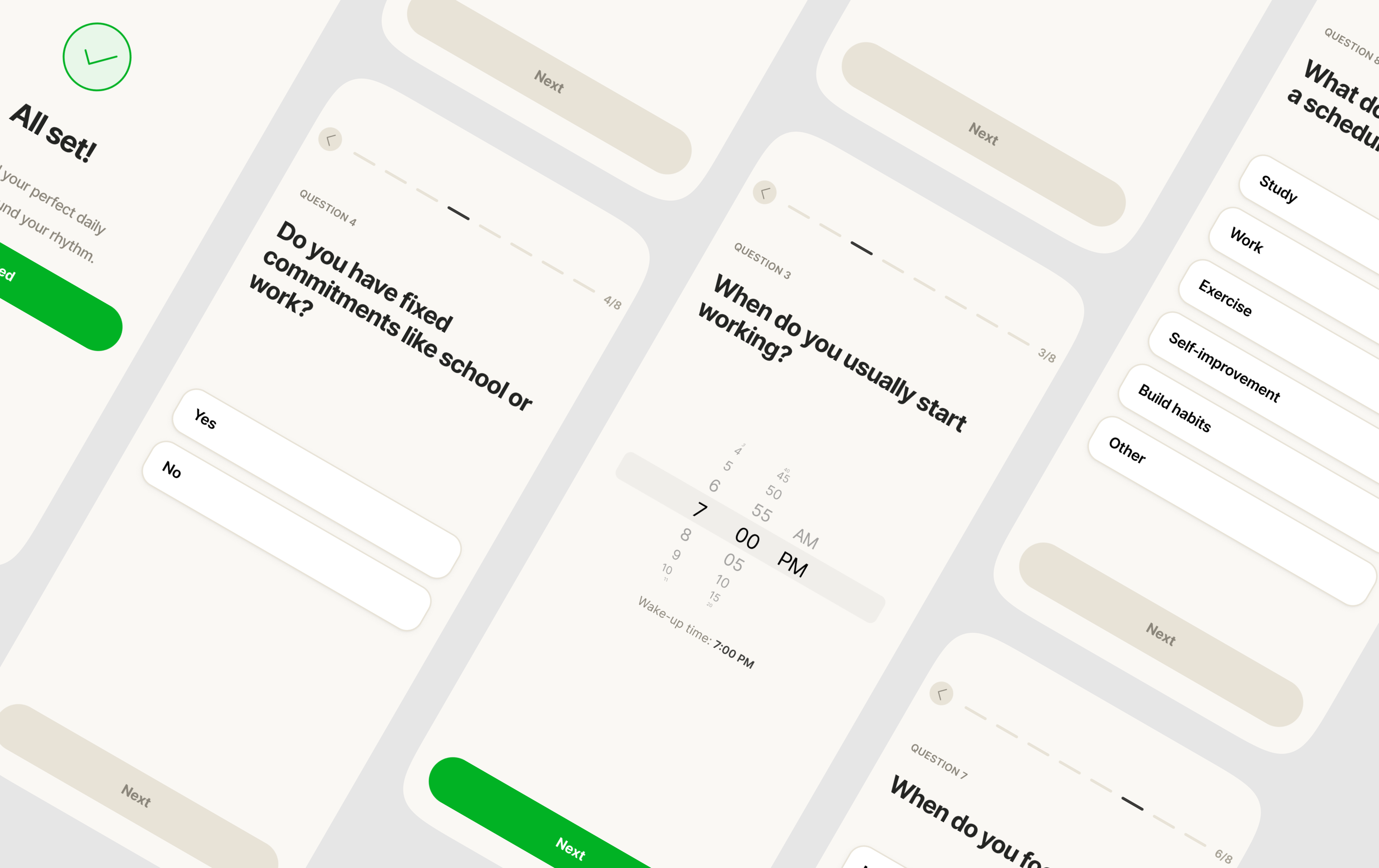
Rather than presenting generic scheduling options, I designed a conversational onboarding flow that gradually collects information about work hours, routines, priorities, and daily habits.
This creates a personalized foundation before users interact with the AI planner.

Home & timeline
The home screen is a vertical timeline of the day. Events sit on the line, AI suggestions float beside it in a distinct style, and free time is visible instead of hidden — because seeing open space is what makes a plan feel achievable.

AI Scheduling
Instead of forcing users to create time blocks manually, DayFlow allows them to describe their plans in natural language. The AI translates those ideas into a structured schedule that users can edit before saving.
AI suggestions should never feel final.
I designed the experience so users can easily review, modify, and reorganize generated schedules, ensuring transparency and maintaining trust in AI recommendations.


